The weather is an essential environmental factor. Mood, activities and our purchasing behaviour are significantly influenced. When it’s warm, we eat ice cream and wear T-shirts. If it is cold, we wear coats and drink hot drinks. This article shows how weather data can be used efficiently as an ad customizer in Google Ads to deliver personalized messages based on the weather in the user’s target region.
Ideas for slogans in ad customizer based on weather data
| Product / Service | Ad Customizer |
| Jackets | Warm jackets for cold days. Weatherproof jackets for rainy days. Lightweight jackets for summer days. Windproof jackets for stormy weather. |
| Food / Gastronomy | Delicious fruit spritzers on offer. Large selection of soft drinks. Hearty soups for lunch. Fresh fruit ice cream daily. |
| Duvets | cuddly, warm winter blankets year-round transitional blankets airy light summer blankets |
I look forward to more ideas on weather data ad customizations in the comments below the post.
Overview of the structure
- Weather data Retrieves via Google Ads Script and the OpenweatherAPI (free plan) into a Google Spreadsheet.
- Import the weather data from the script-filled spreadsheet into another spreadsheet. This makes it possible to reuse the data obtained in step 1 multiple times. This spreadsheet then contains the full ad customizer with the text adjustments for each campaign.
- The ad customizer is added to the business data in the Google Account and an auto-retrieval connection is established.
- Now Google Ads can be used with the new ad customizations.
Collecting weather data for Google Ad-Customizer
- Download Google Ads Script for weather data.
- Add the Google Ads Script to the Google Ads account (Tool > Scripts > + icon.
- Adjust variables at the top of the script.
- OPEN_WEATHER_MAP_API_KEY: A corresponding API key must be entered here. The free key should be enough in most cases. Create an OpenWeatherApi key.
- SPREADSHEET_URL: Create a copy of this spreadsheet and store it in the script.
- Preview Start press. Authorizations for Google Ads and Spreadsheets are queried. These must be confirmed.
- Test execution. If the script works, the first lines of the sheet should now be filled.
- If the execution works, then an hourly execution can be set. The weather data should then be renewed from 0:00 at night and should only be queried once a day.
The weather data table
The list, which now fills up with weather data, has deposited all postcodes of Germany, Austria and Switzerland in its original state. If you want to use other Target locations, that’s not a problem. These are in the sheet geotargets-2020-01-30 and can be updated at any time from here.
If you use a different type than the Target Location “Postal Code”, a small adjustment has to be made in the SEARCHMODE variable in the current version of the script.
Script options for different modes of operation
| Variable | Description |
| DEBUG | writes relevant information for debugging in spreadsheets and the log |
| MODE | CURRENT: The current weather at the site is determined: The weather is determined over the current day in high and low values. |
| SEARCHMODE | ZIP: The postal code is used for search. (default) (use when the location table wird.NAME applied unchanged: It is used by name (value before the 1st comma of Taget Location). |
| LOCATION_UPDATE | Number of hours after weather data is outdated in Current Mode (default: 1h) (note api limits) |
| APILIMIT | Number of retrievals before a timeout |
| timeOutInSeconds | Number of seconds of timeout |
Using Weather Data for Google Ads
So that the weather data from the first spreadsheet can be used for several campaigns / statements, another spreadsheet is now created in which the actual ad customizers are created.
- Copy Google Ads table.
- Exchange URL in the Export cell A1 to the spreadsheet URL created in the first step. If the access works, the weather data collected so far should appear. From column L, the corresponding ad customizers can then be seen.
- Go to the “Setup” sheet. Here you can set ad texts for different weather conditions using some parameters.
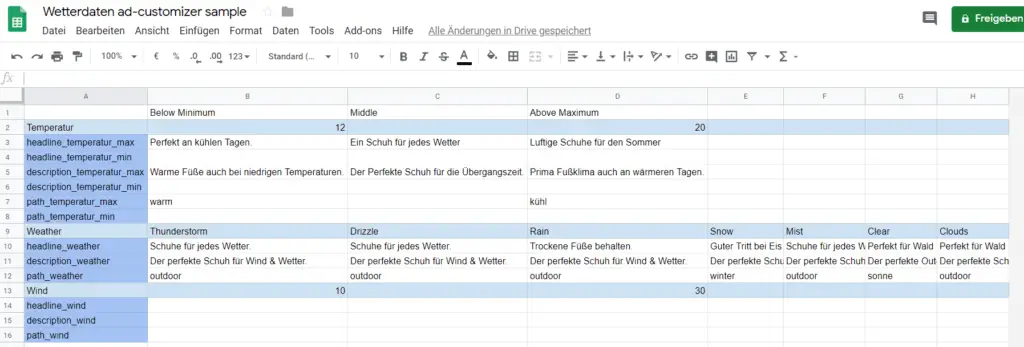
In the Setup table, temperatures can be changed and corresponding texts can be made for one ad adjustment text per condition. This is, of course, just one example, the sheet and its conditions can be changed at will.
Here is a look at the table:
Import weather data into Google Ads
The finished ad customizer can now be imported to Google Ads and then used in the ads.
- Download the created, finished ad-customizer table in spreadsheets as csv (File > Download > Comma-separated Values)
- Import the Ad-Customizer table into Google Business Data (Tools > Business Data > + icon). A short name_with_underdot is recommended.
- Enter the Google table with the ad customizers in the upload plan so that the data is also updated. Attention! Be sure to add required authorizations.
Use Ad Customizer with weather data in Google Ads ads
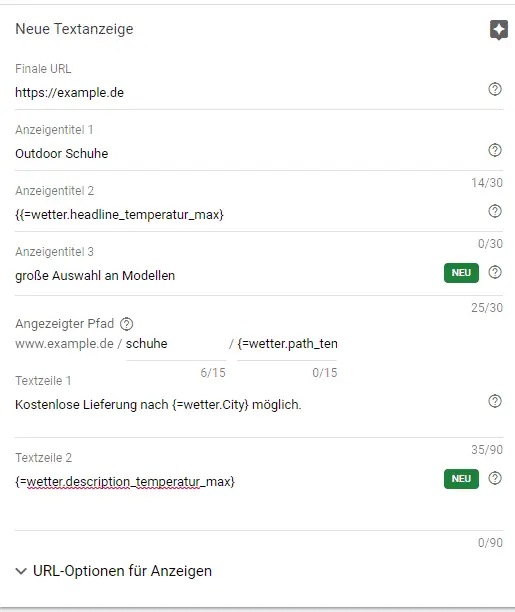
The ad customizer have only the Target Location as the targeting criterion as the demonstrated form. This means that all users who trigger this ad will receive ad customizations based on their current location, provided it is included in the ad customization data.
A new ad is created in the ad group where an ad customizer ad is to be created. If you tap the menu, a menu will automatically open in which “Ad adjustments” can be selected. The table that has just been created will then appear here.

Conclusion
With a few setup steps, it becomes possible to use Google Ads for free with weather data and thus make valuable improvements to you ad-copy.