Shopware BigQuery Integration:
Use data flexibly
Shopware provides order and customer data, Google Analytics shows visitor behavior, and Google Ads tracks campaign performance – but all in separate silos . Integrating Shopware with BigQuery solves precisely this problem. It brings all the data together and creates a central foundation for reporting, tracking, and machine learning . This allows you to design more profitable campaigns and makes your marketing solutions measurably more efficient.
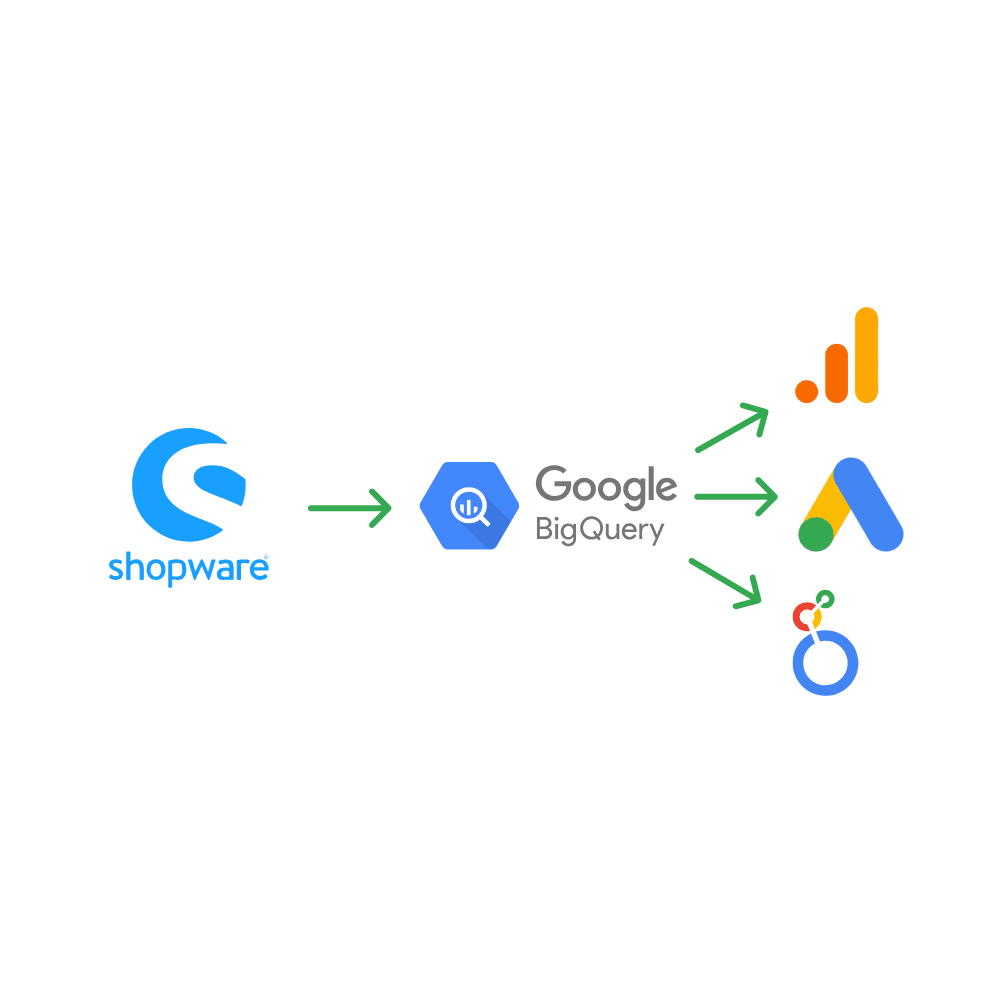
This is what the Shopware BigQuery Importer can do.
Data import to BigQuery
Looker Studio Dashboards
Data usage in Google Ads
Feedback that speaks for itself
Osman Zöllner
We have successfully implemented server-side tracking in various client projects. This has allowed us to significantly improve data quality. The collaboration was professional, solution-oriented, and effective.

Henry Küpers
By implementing tracking, we have created a reliable basis for our decisions.
The collaboration with Bernhard Prange was uncomplicated, competent and goal-oriented.
Ulrike Hewel
By implementing server-side tracking, we at bezahlexperten.de have created a significantly more precise data foundation. The collaboration was professional, focused, and pleasant.

Shopware 6 Dashboard in Looker Studio
With the integration of Shopware 6 and Google BigQuery, all relevant shop data can be visualized in Looker Studio . This creates a comprehensive e-commerce dashboard that delivers customized analyses and KPIs in real time. This allows you to maintain a clear, interactive overview of orders, customers, and products at all times, tailored to your business goals.
Dashboard structure
The Shopware dashboard in Looker Studio is divided into three main areas: Orders, Customers, and Products . Each of these areas offers focused metrics, interactive filters, and detailed views down to the SKU level.
Orders
In the Orders section, you get a complete overview of revenue, the number of orders, and the average and median order value . Time series data illustrates developments and trends, while a heatmap visualizes orders by day of the week and time of day. This allows you to identify peak times and optimally time marketing activities, such as newsletters or campaigns.
Customers
The customer area shows how many new and existing customers are active and which customer groups account for the largest share of revenue. You can also see how long customers have been active in the shop, when they last logged in, and when they last placed an order. Maps and charts provide insights into the geographic distribution of customers and reveal which regions generate the highest net sales.
Products
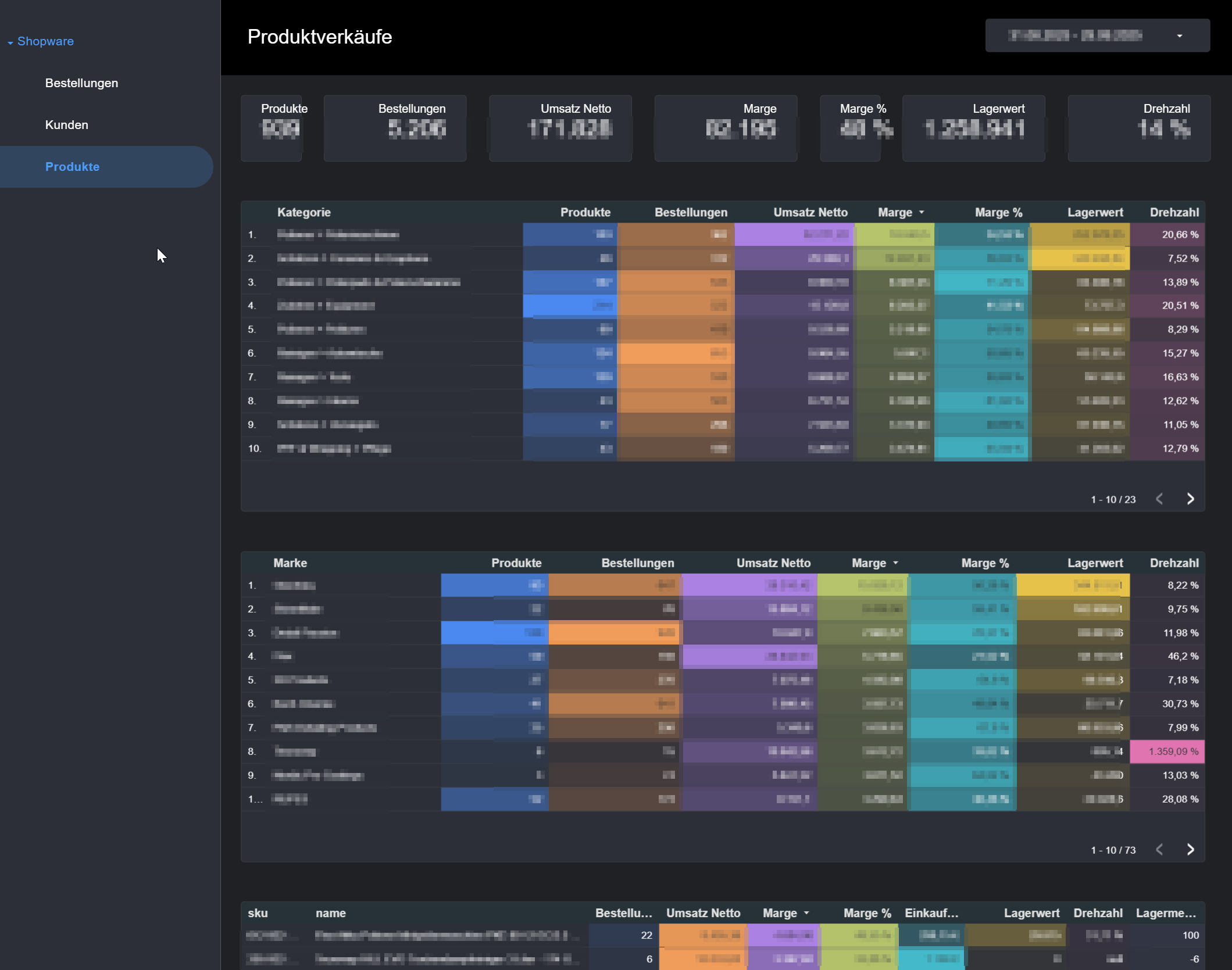
The product dashboard focuses on key performance indicators (KPIs) such as revenue, margin, inventory, and turnover . Rankings by category and brand show at a glance which products are selling best, which margins are particularly profitable, and which items are tying up capital in inventory. Detailed information at the SKU level provides a clear basis for purchasing, marketing, and inventory planning.
Advantages of the Shopware 6 Looker Studio integration
The combination of Shopware 6, Google BigQuery and Looker Studio offers crucial advantages for data-driven work in e-commerce:
- All relevant shop data is automatically made available in Google BigQuery.
- Creating custom, expandable dashboards in Looker Studio
- No limitations due to the standard reports in Shopware
- Flexible combination with other data sources such as Google Ads, Analytics or CRM systems
- Ideally suited for e-commerce controlling, marketing, sales and management.
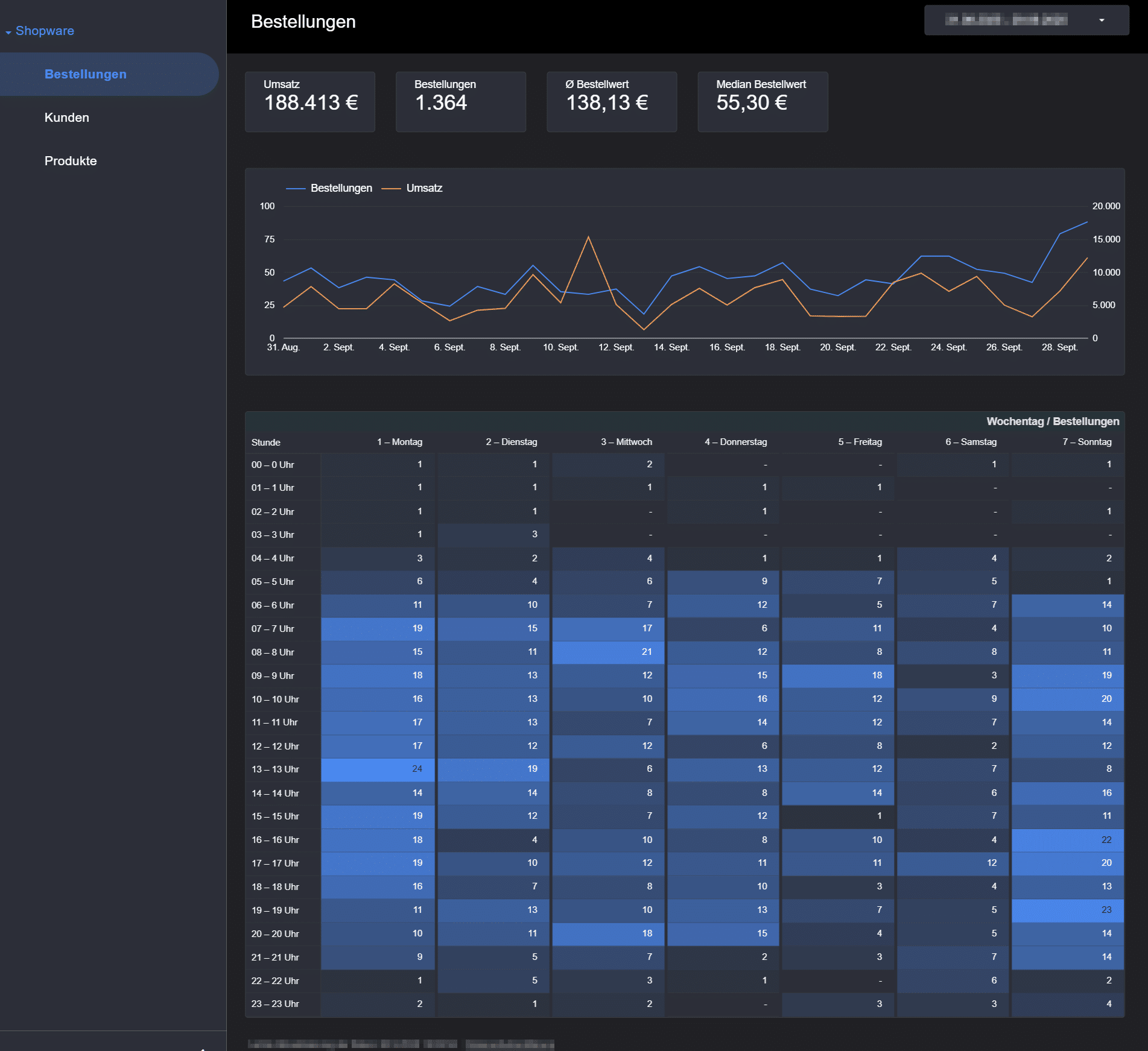
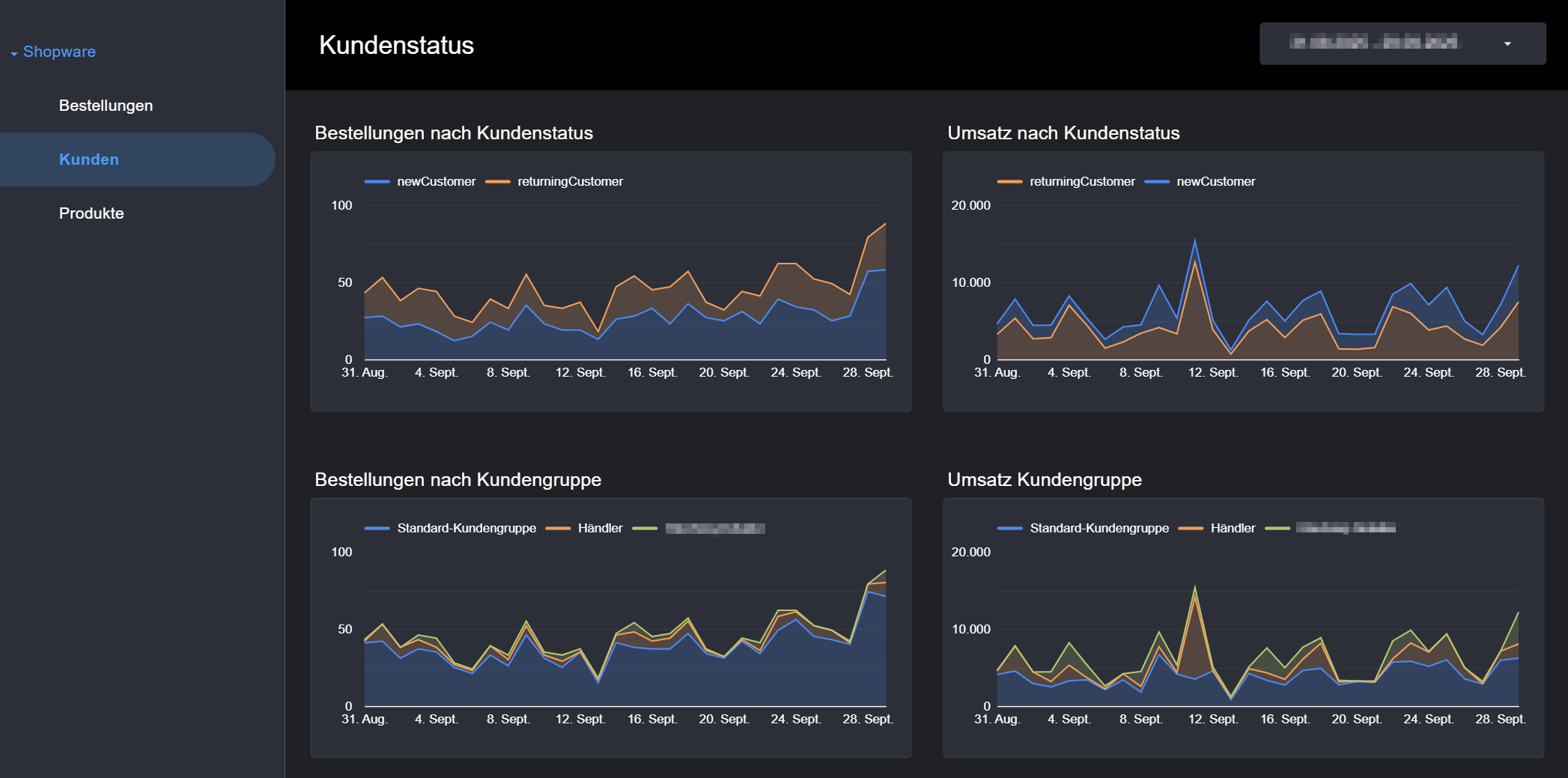
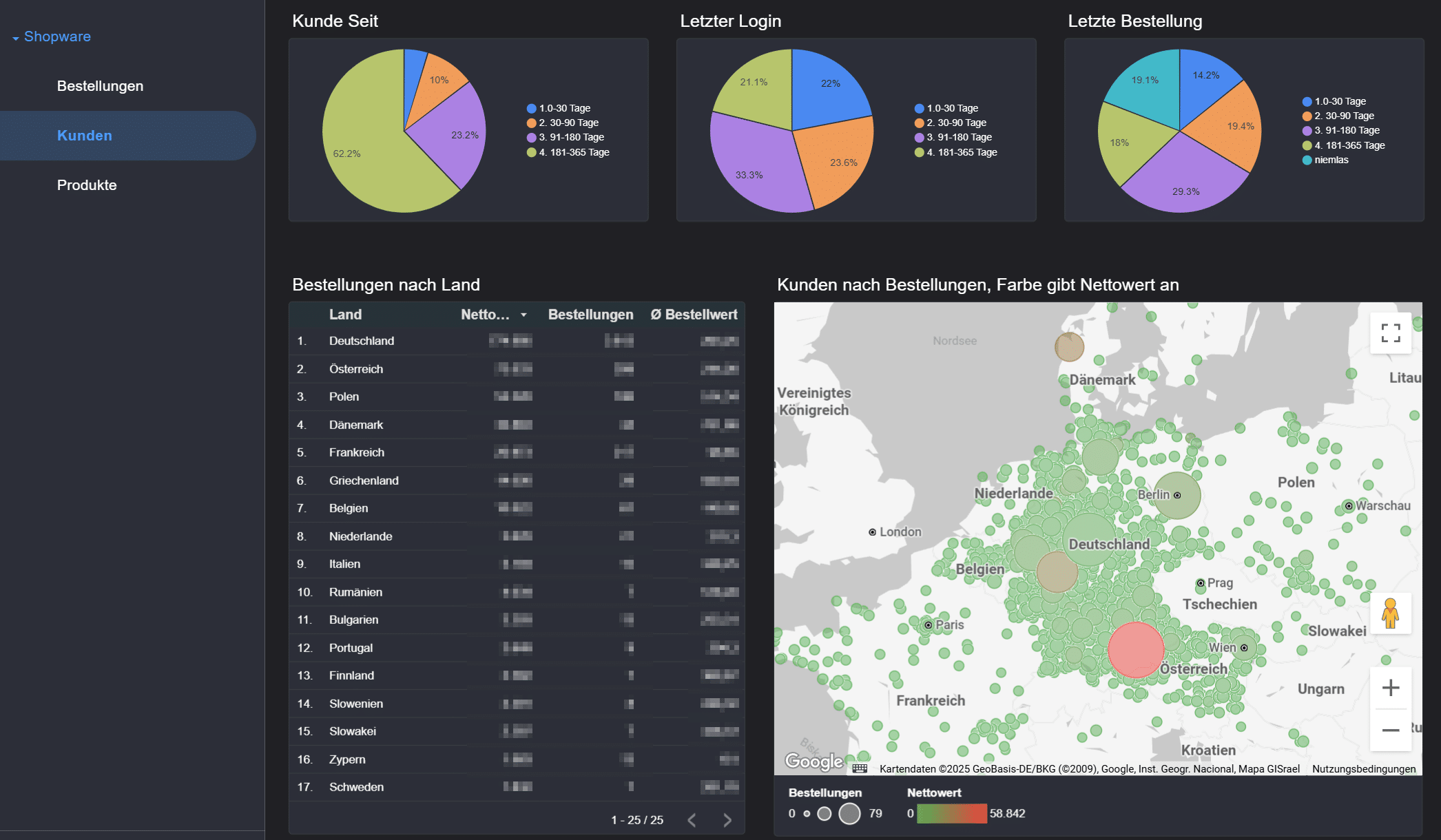
Shopware data import to BigQuery
The Shopware BigQuery Importer allows you to integrate Shopware order data, customer data, and product data into Google BigQuery on a daily basis. From there, the data can be converted into a desired format, for example, to display it in Lookerstudio or to calculate individual CLV values.

Data extension in BigQuery
The possibilities for further use of the data in BigQuery are many. Here are some use cases that we implement on a daily basis.
Profit instead of revenue (POAS)
ROAS shows the revenue per advertising euro. But revenue is not the same as profit. Through integration , product costs and margins from Shopware can be taken into account and sent to Google Ads as profit data .
The result:
- Campaign optimization for profit (POAS)
- Better bidding strategies with Smart Bidding
- More efficient budgets & sustainable growth
Customer groups & status for tracking
Shopware provides information such as customer groups (B2B, B2C, VIP) or customer status (new or existing customer). This data can be used in Analytics and Ads to:
- to address target groups more precisely
- Serving VIP customers with special campaigns
- To launch reactivation campaigns for inactive customers
Combining Shopware & Analytics data
The integration allows shop and GA4 data to be combined in BigQuery . This creates a 360° analysis of the customer journey:
- Which channels generate the most profitable revenue?
- How do users behave before and after the purchase?
- Which campaigns are effective across multiple touchpoints?
- Serving VIP customers with special campaigns
- To launch reactivation campaigns for inactive customers
Machine Learning for Customer Segments
With the combined data , AI models can automatically identify customer segments . Examples:
- Loyalty analysis (repeat buyers vs. one-time buyers)
- Probability of emigration
- Dynamic segmentation in real time
This allows campaigns to be highly personalized.
The Shopware BigQuery integration is a game-changer for marketing professionals. It creates a central data foundation for dashboards, profit optimization, and AI applications.
Your advantages:
- More transparency
- Better decisions
- Higher profitability

Your contact for Google Shopping & Tracking
I am Bernhard Prange and have been working with Google Ads and tracking since 2014. Over the years, I have helped numerous online shops and agencies to manage their shopping campaigns more profitably, solve tracking problems and use budgets efficiently.
My approach is practical: Implement technical setups cleanly, ensure data quality and control campaigns transparently. This is how results are created that you can rely on.
As a Google Shopping agency, we ensure efficiency and growth in e-commerce – day after day. The satisfaction and success of our customers are our top priority. Together we develop solutions with which you can achieve sustainable success.
Jetzt kostenloses Beratungsgespräch vereinbaren
FAQ – Shopware BigQuery Integration
Below you will find answers to frequently asked questions about Shopware BigQuery integration – specifically for marketing managers who are concerned with topics such as data protection, strategic advantages, technical implementation and practical applications.
New knowledge about Google Ads & Tracking
-
Why we built the GA4 Auditor, a free Google Analytics debugging tool
GA4 is the standard today – and at the same time one of the most frequent causes of incorrect marketing decisions. Not because Google Analytics 4 is “bad”, but because…